

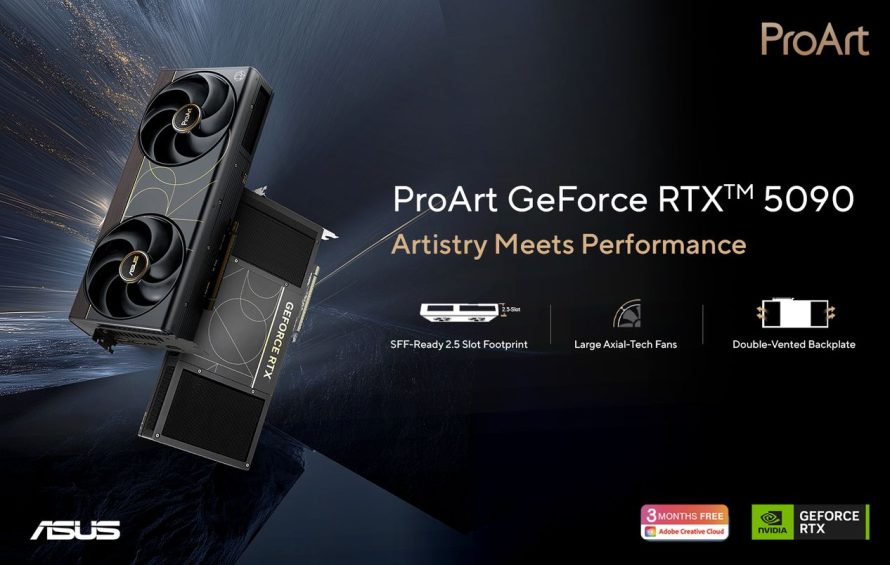

ASUS has introduced the ProArt GeForce RTX 5090, a creator-focused graphics card built for serious AI work, high-end rendering, and compact workstation builds. Instead of chasing loud gamer styling, this card takes the ProArt route with a clean body, a brown wood-patterned trim, and a slim 2.5-slot design that should make sense for creators who want RTX 5090 performance without turning their PC into a glowing spaceship.
At its core, the ProArt GeForce RTX 5090 is powered by NVIDIA Blackwell architecture and comes with 32GB of GDDR7 memory. That combination gives the card the muscle for demanding workloads such as large language models, generative AI projects, 3D rendering, video production, and high-resolution content creation. With 3352 AI TOPs, it is clearly aimed at users who treat the GPU as a production engine, not just a frame-rate trophy.
Blackwell Power for AI and Creative Workloads
The biggest appeal of this card is its balance between raw performance and professional usability. The 32GB GDDR7 VRAM gives creators more room to handle large textures, complex timelines, heavy scenes, and AI models. For video editors, 3D artists, developers, and designers, that extra memory can reduce bottlenecks when working with large assets. It also supports NVIDIA RTX technologies including Multi Frame Generation, Ray Reconstruction, Super Resolution, and Reflex 2 with Frame Warp.
Gaming is not the main personality here, but the hardware is obviously capable of premium 4K gameplay. DLSS 4.5 support helps improve performance and visual quality in compatible titles. Still, the ProArt branding makes the mission pretty clear: this is a card for people who render, train, generate, preview, and export more often than they brag about benchmark charts online, humanity’s favorite modern campfire ritual.
Compact 2.5-Slot Design for Serious Builds
The ProArt GeForce RTX 5090 is the first ASUS 2.5-slot RTX 5090 graphics card, and that matters more than it sounds. Many high-end GPUs are huge, which can block expansion slots and make small-form-factor builds painful. This slimmer profile gives workstation builders more flexibility, especially when using capture cards, storage expansion cards, or other PCIe hardware alongside a compact GPU.
Its smaller size does not mean ASUS simply shaved off metal and hoped physics would behave. The card uses a double flow-through cooling structure designed to move air more efficiently through the heatsink and backplate. ASUS says this setup offers around 11% better cooling efficiency and a 27% smaller size compared with single-flow-through designs. Apparently, thermal engineering still exists, despite the internet’s best efforts to reduce everything to vibes.
Cooling Built for Long Creative Sessions
Cooling is one of the major technical highlights. The ProArt GeForce RTX 5090 uses liquid metal thermal compound on the GPU die, a vapor chamber, a double-vented backplate, and enlarged 115mm Axial-tech fans. Together, these components are designed to keep the GPU stable during long rendering sessions, AI processing, or other heavy workloads where performance drops can become deeply annoying.
The flow-through zones help move hot air away from the card more effectively, while the vapor chamber spreads heat across the cooling assembly. This is useful for creators who run workloads for hours, not just short bursts. The goal is sustained performance with better thermal control, which is exactly what a professional card should deliver before anyone starts pretending that fan noise is a personality trait.
Creator-Friendly Connectivity and Software Control
Another practical feature is the integrated USB Type-C port. This gives creators a cleaner way to connect portable displays or support multi-monitor setups without piling up extra adapters. For desk setups built around editing, color review, streaming, or mobile display workflows, that USB-C connectivity can make the card more convenient than a standard high-end GPU.
GPU Tweak III adds another layer of control, letting users monitor performance, adjust fan curves, tune power limits, and enable one-click overclocking. The OSD Wizard also allows customized on-screen display layouts. For creators who want smoother previews, faster exports, and better control over acoustics, this software support makes the ProArt GeForce RTX 5090 feel less like a raw component and more like a workstation tool.
A Minimalist RTX 5090 for ProArt Workstations
The design language is also worth noting. With its rounded front edge and brown laminate trim, the card is made to visually match wood-themed ProArt cases such as the ProArt PA401 Wood Edition and PA602 Wood Edition. That gives builders a more refined option than the usual aggressive GPU aesthetic, which often looks like it was designed during a lightning storm inside a gaming chair factory.
ASUS has not included final pricing or full regional availability details in the announcement, but the ProArt GeForce RTX 5090 is clearly positioned as a premium GPU for professional creators, AI developers, and compact workstation builders. For users who need 32GB of GDDR7, Blackwell architecture, efficient 2.5-slot cooling, and creator-focused connectivity, ASUS is making a strong case for a workstation GPU that looks calm but behaves like a computational monster.
| Specification | ASUS ProArt GeForce RTX 5090 |
|---|---|
| GPU Architecture | NVIDIA Blackwell |
| Memory | 32GB GDDR7 |
| AI Performance | 3352 AI TOPs |
| Form Factor | 2.5-slot design |
| Cooling Design | Double flow-through cooling with vapor chamber |
| Thermal Compound | Liquid metal on GPU die |
| Fans | Enlarged 115mm Axial-tech fans |
| Backplate | Double-vented backplate with flow-through zones |
| Cooling Efficiency | Approximately 11% better cooling efficiency compared with single-flow-through designs |
| Size Improvement | Approximately 27% smaller than single-flow-through designs |
| Display Connectivity | Integrated USB Type-C port |
| Software | GPU Tweak III with monitoring, tuning, OSD Wizard, and OC Mode |
| Design | Minimalist ProArt styling with brown wood-patterned trim |
| Target Users | Creative professionals, AI developers, and small-form-factor PC builders |