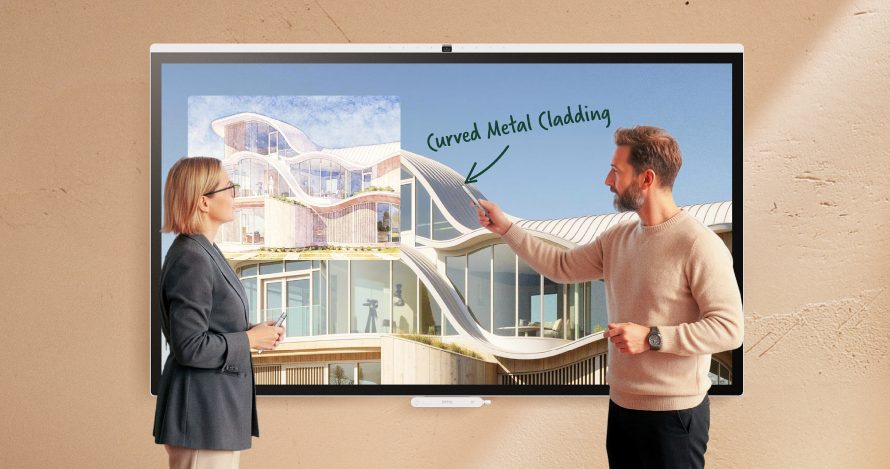
BenQ is bringing more of the meeting room into the display itself with the BenQ Board CP05. Available in 55-inch and 75-inch models, this corporate collaboration board combines video conferencing, wireless sharing, whiteboarding, room scheduling, and AI meeting tools. The interesting part is how that combination serves teams that need to examine visual work together, from architectural drawings to creative presentations, while keeping remote colleagues involved.
The announcement describes a shared CP05 feature set rather than a detailed breakdown of each size. That makes this primarily a choice between two display formats, with some configuration details still worth checking before purchase. BenQ also mentions a separate CM05 board, but provides too little information to make a meaningful comparison with that product.
55-Inch vs. 75-Inch: Choose Around the Work
The clearest difference is screen size: 55 inches versus 75 inches. The smaller CP05 is the more space-conscious option for compact meeting areas, where participants gather relatively close to the display. It should appeal to teams that want a shared presentation and whiteboarding surface without making a large screen the dominant feature of the room.
The 75-inch version makes more sense when the shared canvas needs greater physical presence. Think group reviews of building plans, campaign layouts, or documents that several people need to inspect simultaneously. Its larger surface also gives collaborators more physical room to interact with the board. The trade-off is straightforward: it needs more wall space, and room layout still determines whether everyone can read the material comfortably.
BenQ lists 4K UHD resolution for the CP05 family. A larger screen therefore should not be confused with additional digital workspace or more image detail. Its practical advantage is presenting that content at a larger physical scale. Neither size is automatically better; viewing distance and the type of content should drive the decision.
Meeting Tools That Share One Starting Point
Users can sign in through NFC, QR codes, or single sign-on credentials, then access cloud files and applications. Microsoft 365 and Google Workspace integration brings room availability, scheduling, and shared resources onto the display. For teams moving between meeting spaces, the appeal is having a consistent place to begin instead of assembling the workflow from separate tools each time.
Wireless sharing and whiteboarding cover presentations and brainstorming, while touch support reaches up to 50 points. That gives the board scope for multiple simultaneous inputs, although the announcement does not explain the conditions behind that maximum. Centralized device management is another practical inclusion for IT teams overseeing several rooms.
For hybrid meetings, the listed hardware includes a 50MP camera with 4K capability, an eight-microphone array, and up to 90W of integrated audio. BenQ claims microphone pickup out to 40 feet. Gallery View, voice tracking, intelligent framing, gesture controls, noise suppression, and speech enhancement aim to reduce manual adjustments. Those specifications describe the intended coverage and functionality; they are not evidence of performance in a particular room.
On-Device AI Takes Aim at Meeting Admin
The CP05 runs Android 15 and includes a dedicated 10 TOPS AI processor. Its SummarAI tools generate transcripts, summaries, and meeting minutes, targeting the administrative work that follows a discussion. A team reviewing a proposal could use those outputs as a starting point for documenting decisions, while still checking names, commitments, and technical details.
BenQ says its Edge AI processing happens directly on the display, positioning local processing as a responsiveness and privacy benefit. That is useful context, but it does not establish that every connected service operates locally. Microsoft 365, Google Workspace, conferencing applications, and cloud files remain separate considerations when evaluating the overall workflow.
The announcement also leaves several purchasing questions unanswered, including supported transcription languages, any subscription requirements, and detailed application compatibility. The 10 TOPS figure indicates processing capacity, but cannot tell buyers how accurate a transcript will be or how effectively a summary captures a complicated conversation.
Visual Review Is the CP05’s Stronger Differentiator
Beyond conferencing, the CP05 offers Pantone Validated and Pantone SkinTone Validated color performance with 95% DCI-P3 coverage. Those credentials are relevant to creative teams discussing imagery and skin tones. However, color coverage alone does not establish a complete color-managed workflow across every participant’s devices.
High Detail Mode targets drawings and technical documents, while M-Book Mode aims for consistency with MacBook displays. ePaper Mode addresses reading, coding, and document review. DICOM Mode is intended for medical imagery and radiograph review, although the announcement does not establish diagnostic certification. These modes give the board a broader role than displaying slides.
The 55-inch and 75-inch CP05 models are available from BenQ, with pricing unspecified in the announcement. The smaller version suits space-conscious collaboration; the larger one prioritizes a more expansive shared view. Before ordering, confirm model-specific specifications, particularly features described with “up to” limits.
| Feature | CP05 55-Inch | CP05 75-Inch |
|---|---|---|
| Screen size | 55 inches | 75 inches |
| Suggested use | Compact meeting areas and close-range collaboration | Larger shared presentations and group visual reviews |
| Resolution | 4K UHD | 4K UHD |
| Operating system | Android 15 | Android 15 |
| AI processor | Dedicated 10 TOPS processor | Dedicated 10 TOPS processor |
| Meeting AI | SummarAI transcription, summaries, and minutes | SummarAI transcription, summaries, and minutes |
| Camera | 50MP 4K AI camera | 50MP 4K AI camera |
| Microphones | Eight-microphone array; claimed pickup up to 40 ft | Eight-microphone array; claimed pickup up to 40 ft |
| Color | 95% DCI-P3; Pantone Validated; Pantone SkinTone Validated | 95% DCI-P3; Pantone Validated; Pantone SkinTone Validated |
| Display modes | DICOM, High Detail, M-Book, ePaper | DICOM, High Detail, M-Book, ePaper |
| Touch support | Family maximum: up to 50 points | Family maximum: up to 50 points |
| Integrated audio | Family maximum: up to 90W | Family maximum: up to 90W |
| Sign-in options | NFC, QR code, single sign-on | NFC, QR code, single sign-on |
| Workspace integration | Microsoft 365 and Google Workspace | Microsoft 365 and Google Workspace |
| Collaboration and management | Wireless sharing, whiteboarding, room scheduling, centralized management | Wireless sharing, whiteboarding, room scheduling, centralized management |
| Price | Not specified | Not specified |
| Availability | Available at announcement | Available at announcement |