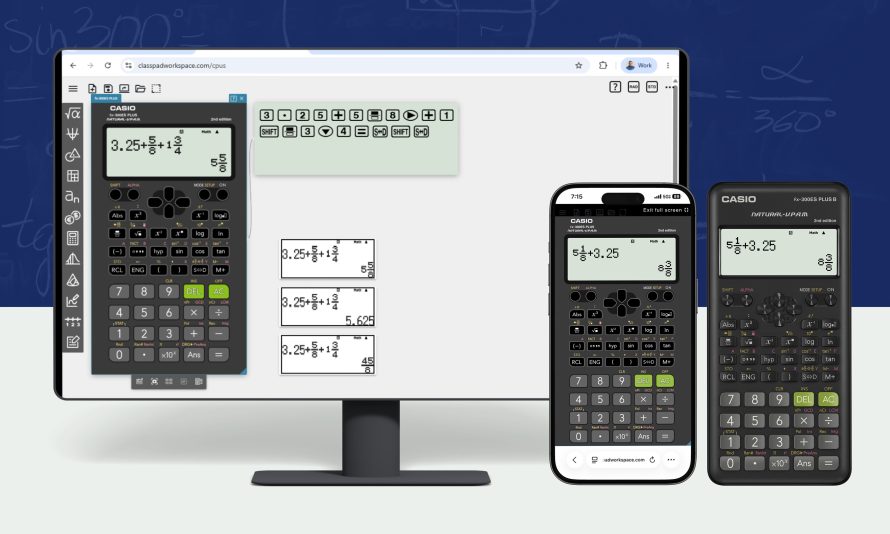
Casio is expanding access to digital learning by introducing the fx-300ES PLUS Online Emulator, a browser-based version of one of its most recognizable scientific calculators. Developed by Casio, the new tool gives students, teachers, and parents free access to the familiar calculator experience without requiring dedicated hardware or software installation.
Instead of downloading applications or purchasing a physical calculator, users can simply sign in through supported education-friendly platforms and begin using the emulator from almost any internet-connected device. The goal is to make math learning more accessible both inside and outside the classroom.
Turning a Classroom Favorite Into a Web Tool
The online emulator faithfully reproduces the interface and functionality of the physical fx-300ES PLUS scientific calculator. Students who already use the calculator in school can transition between physical and digital versions with virtually no learning curve.
Because the emulator runs directly in a web browser, it works across Chromebooks, Windows laptops, tablets, and other compatible devices. This flexibility allows students to continue solving assignments whether they are at school, at home, or studying on the go.
Features Designed for Interactive Learning
One of the most practical additions is the Projection Mode, which enlarges the calculator display for classroom presentations. Teachers can demonstrate calculations on projectors or interactive whiteboards while every student follows the same sequence of inputs.
The integrated Key Log records every button press during calculations. Instead of only viewing the final answer, students can review the complete process, making it easier to identify mistakes and understand mathematical procedures.
Natural Display and Easy Accessibility
The emulator keeps Casio’s well-known Natural Textbook Display, presenting fractions, roots, exponents, and mathematical expressions in a format that closely resembles printed textbooks. This familiar layout reduces confusion, especially for learners who are still developing mathematical skills.
Users can also capture screenshots of calculator results for reports, homework, or classroom discussions. Since everything operates in the browser, there is no need for downloads, subscriptions, or complicated setup procedures.
A Practical Addition to Modern Education
The launch reflects a broader shift toward browser-based educational tools that work across multiple platforms. Schools increasingly rely on cloud-based services, making web applications easier to deploy and maintain than device-specific software.
While the physical fx-300ES PLUS calculator remains available through retailers for approximately $15, the free online emulator provides an alternative for students who need immediate access from any compatible device. Casio America says the service is available now through ClassPad.net and can be accessed using Google, Google Classroom, Microsoft, or Clever accounts, giving educators another flexible option for digital math instruction.
| Specification | Details |
|---|---|
| Product | Casio fx-300ES PLUS Online Emulator |
| Developer | Casio America, Inc. |
| Type | Web-based Scientific Calculator Emulator |
| Access | Free via ClassPad.net |
| Login Methods | Google, Google Classroom, Microsoft, Clever |
| Supported Devices | Any web-enabled computer, Chromebook, tablet, or mobile device |
| Key Features | Projection Mode, Key Log, Natural Textbook Display, Screenshot Capture |
| Installation | None (Browser-based) |
| Subscription | Free |
| Physical Calculator | fx-300ES PLUS (approximately US$15) |