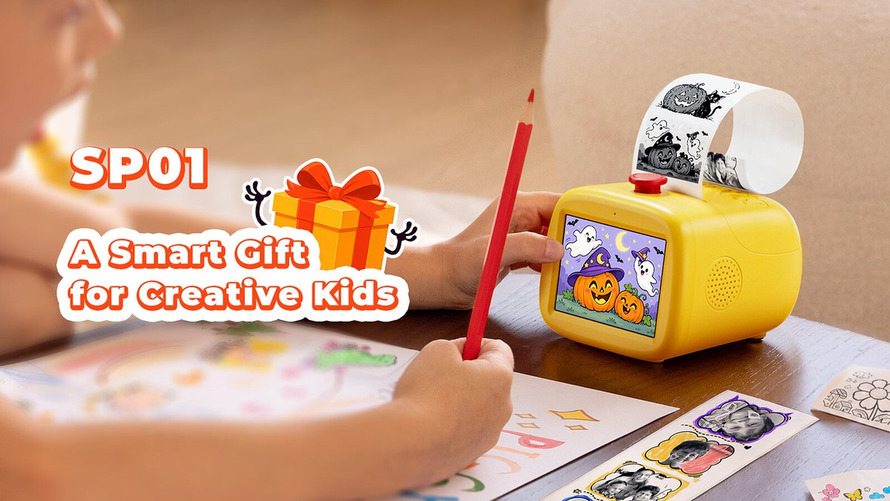
MUNBYN is bringing voice input to children’s craft printing with the SP01, announced in an October 1 press release. A child describes an idea, and the device turns it into a black-and-white sticker design for printing and coloring. The interesting shift is from preparing a file on another screen to starting with a spoken prompt. This report is based on launch materials rather than hands-on testing. Performance claims remain attributed to the company, and buyers should compare final retail documentation, privacy terms, warranty coverage, regional availability, and any recurring fees before deciding whether the product fits their own routine.
A Small Printer With a Creative Workflow
The SP01 uses inkless thermal printing, producing outlines rather than finished color artwork. Markers or pencils provide the next stage of the activity, so the printed result is a starting point for a craft project. MUNBYN lists a 203 dpi print resolution on its product page. That specification describes the output process; it does not tell us how closely the AI will follow every child’s description. The distinction matters because a successful print and a satisfying interpretation of an idea are different things.
Physical Controls and a Built-In Display
Despite the company’s screen-free marketing language, the printer has a 3.5-inch display. Its official FAQ describes a physical button and direct creation on the device, while the companion app handles setup and supporting features. That is a narrower claim than having no screen at all. The press release also describes a photo-strip mode with four pictures taken in succession. Families choosing it for artwork should separate the appeal of creating an outline from the separate task of printing a photograph; neither use automatically establishes color-photo quality. Physical output is also central to compact photo printing for families, although the SP01’s colorable thermal designs serve a different purpose from finished photo prints.
Voice Activation and the Privacy Question
MUNBYN describes button-activated voice input rather than continuous background listening. Its launch release also says voice processing stays local, while the product FAQ discusses account-based functions and print records in the companion app. Those are company descriptions, not an independent privacy audit. Parents should examine the current app permissions and account settings before enabling sharing or stored records. The company advertises safeguards for inappropriate outputs, but a content filter should be treated as a feature to assess, not a guarantee that supervision is unnecessary.
Power, Paper and Availability
The official FAQ says the SP01 uses a 9V/2A power adapter and has no built-in battery. It therefore needs a powered location rather than functioning as a pocket printer for an outing. MUNBYN lists dual-band Wi-Fi support and compatible thermal sticker paper; replacing ink with heat does not remove the need to buy consumables. The US page displays $79.99 alongside $129.99 as the original price, but also contains conflicting stock and shipping messages. Treat the displayed promotion and fulfillment wording as a checkout question, not assured immediate availability.
The strongest case for the SP01 is its short path from a spoken idea to a physical craft, provided the family is comfortable with its app setup and consumables. At MUNBYN, the product documentation makes the power requirement and built-in screen explicit, two details that deserve as much attention as the AI label.
| Specification | Details |
|---|---|
| Printing | Inkless thermal; black-and-white sticker designs |
| Resolution | 203 dpi |
| Display | 3.5 inches |
| Power | 9V/2A adapter; no built-in battery |
| Wi-Fi | 2.4 GHz and 5 GHz |
| US displayed price | $79.99; stock and promotion need checkout confirmation |